See it. Together.
Share a screen through WebRTC. Choose your quality, go full screen, and keep an eye on connection stats.
SCREEN SHARING 01 Desk Viewer
See the same screen. Solve it together. Simple desktop sharing, with control that stays in your hands.
Windows first. Built for desktop.
CLOSER, WITHOUT THE COMPLICATIONS
Everything you need to share a desktop.
A little more say in how you share it.
Share a screen through WebRTC. Choose your quality, go full screen, and keep an eye on connection stats.
SCREEN SHARING 01Start with view only. Allow mouse and keyboard control when it helps, and take it back whenever you choose.
OPTIONAL REMOTE CONTROL 02Keep device names and notes in your address book. Find recent sessions without saving anyone's password.
LOCAL ADDRESS BOOK 03AN INVITATION, NOT AN OPEN DOOR
Every session starts with a password and a person saying yes. Here's how it comes together.
Pass along your device ID and current session password.
Review the request. Accept when you're ready.
View together. Allow control only if you want it.
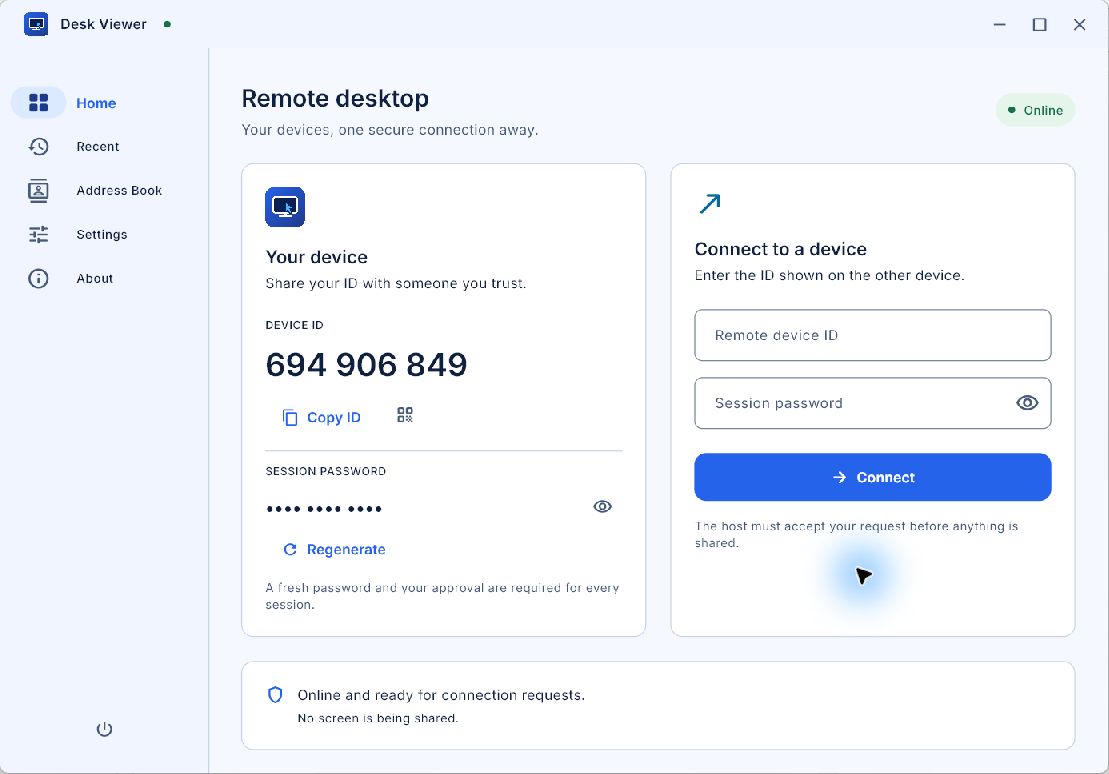
A LOOK INSIDE THE REAL APP
Your device details and connection form, captured from the Windows app. The session password is hidden.
Actual Windows screenshots. The Address Book is empty; these images do not show an active remote session.
LET'S CLOSE THE DISTANCE
Install Desk Viewer on both computers.
One app to share. The same app to connect.
Download the Windows x64 installer, verify your file, then run Setup. Install Desk Viewer on both computers.
Download for Windows Or build the Windows app from source ↗Version 1.0.0 · Windows x64 · 17.7 MB
Unsigned installer. Verify your download before running Setup.
Yes. Desk Viewer is built for attended sessions. The host shares their current password and must explicitly accept every connection request. Unattended access is not available.
Sessions begin in view-only mode. The host can allow mouse and keyboard control and revoke it during the session. Windows, macOS, and Linux X11 have platform-specific requirements. Wayland hosts remain view only.
The desktop code targets Windows, macOS, and Linux, and each installation can host or view. Windows is the primary tested platform; macOS and Linux require native builds and testing. macOS hosting needs Screen Recording permission, and control needs Accessibility permission.
Screen sharing, optional remote input, a local address book, recent connections, themes, and session statistics. File transfer, clipboard sync, audio, recording, and unattended access are not implemented.
This is an attended remote-access prototype. Use controlled pilots while release work is completed. The current app uses plain WebSocket signaling; deploy trusted WSS signaling and rebuild the client before distributing beyond development. Signing, platform verification, and the security review are part of the release process. Read the release guidance.
A little help.
A shared perspective.